
How to Write a Japanese Estimate
This guide uses sample images to explain the role of a Japanese estimate, how the full document is structured, how the line-item table works, and what to check for tax display and storage.
Role and Timing of an Estimate
What an estimate is
An estimate is a document used before goods or services are provided to present the price, quantity, schedule, and other conditions to the counterparty. It is not the contract itself, but it often becomes the baseline for later ordering, contracting, and invoicing, so the proposed conditions should be organized in a way that is easy to read.
When to present it
An estimate is normally presented before the counterparty decides whether to place the order, such as when responding to an inquiry, confirming terms before ordering, or notifying a price revision. It is meant to share the amount, scope, and assumptions in advance, so presenting it before the transaction starts is the basic practice.
Estimate vs invoice
An estimate is a document used before contract formation to present conditions and expected cost, while an invoice is a document used after the transaction to request payment. Even though both can contain amounts, the estimate proposes terms and the invoice demands payment.
- Estimate: a document used before the transaction to present conditions, quantities, amounts, and assumptions.
- Invoice: a document used after the transaction to notify the amount due, due date, and remittance details in order to request payment.
Read the Full Estimate from One Sample
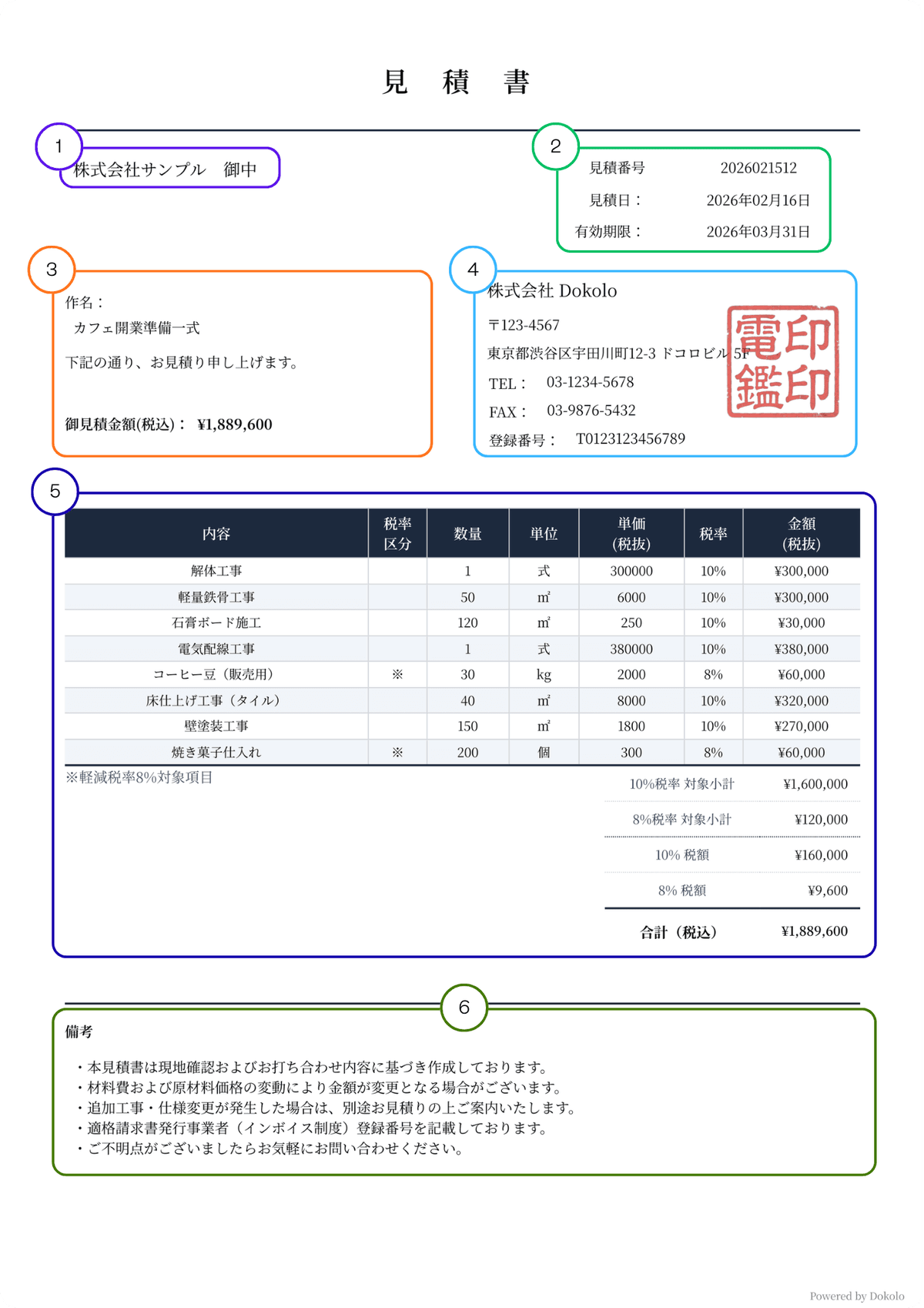
This sample breaks the estimate into six blocks: the recipient, estimate information, subject and summary, issuer block, line-item table, and notes.
What to Enter in Each Numbered Area
Understanding what belongs in each block makes it much easier to organize the proposed conditions, amount, and assumptions that you want to present to the counterparty.
Recipient (宛名)
Enter the company name or individual name receiving the receipt. For a company or organization, it is standard to add "御中." For an individual, add "様." If needed, you can also include the department name or the name of the person in charge on the same line. Examples: ・株式会社Dokolo 御中 ・株式会社Dokolo 経理部 御中 ・株式会社Dokolo 経理部 山田 太郎 様 ・山田 太郎 様 For ordinary B2B estimates, it is generally safer to state the recipient clearly so the counterparty can review and circulate the document internally without confusion.
Estimate number, estimate date, and validity period
The estimate number is a management number, and using a sequence or project-based number makes later comparison easier. The estimate date is the date of issuance, while the validity period shows how long the proposed conditions and amount remain available. If material or labor costs may change, making the validity period explicit is particularly important in practice.
Subject and estimate summary
Use the subject line for the project name, work name, or other clear identifier. This block should let the reader understand both what the estimate is for and approximately how much it will cost. The total shown here must match the detailed table and the final total below.
Issuer details and seal image
The issuer's name must be stated. The address, postal code, phone number, fax number, and email address are not legally mandatory, but they are commonly included so the estimate can function as a formal proposal and support follow-up communication. A seal impression is customary, not legally required.
Line-item table
This is the core of the estimate. It shows the description, quantity, unit, unit price, tax rate, and amount so the counterparty can understand how the proposed total is built. If multiple tax rates are involved, the subtotals and tax amounts by rate should reconcile cleanly to the final total.
Notes
Use the notes block for assumptions, handling of additional costs, delivery timing, work scope, or other conditions that need clarification. Because an estimate is a pre-contract document, it helps to spell out points that could otherwise become sources of misunderstanding later.
How to Read the Line-Item Table
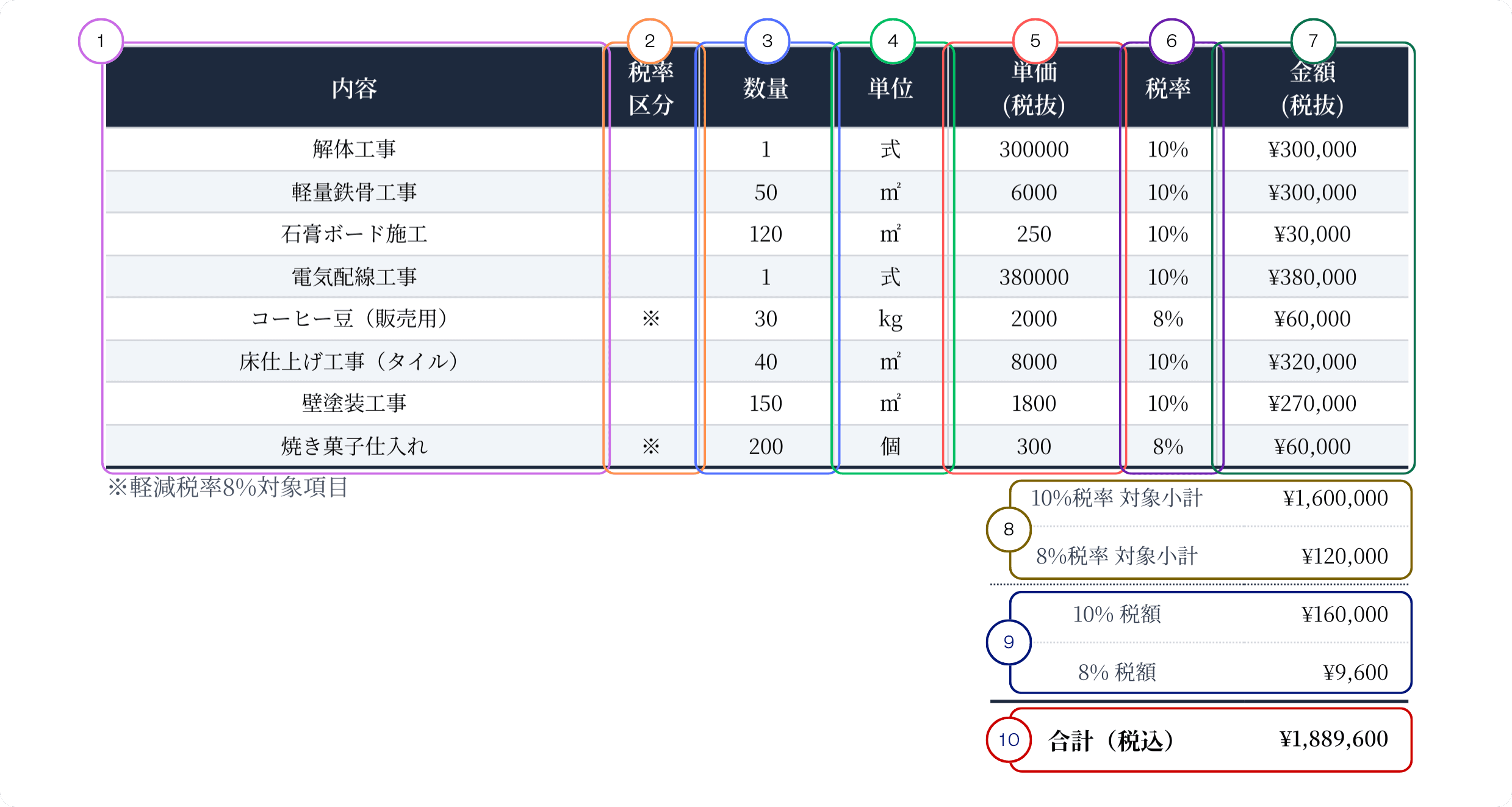
This enlarged image focuses on the columns in the estimate line-item table and the tax-rate summary areas, numbered from 1 to 10.
What Each Column Means
The line-item table is the most important block for proving how the estimated amount was built. When each column is used consistently, review and negotiation become much easier.
Description
Describe the work item, product, or service specifically. The line should be concrete enough that a third party can understand what the estimate covers later. If helpful, separate the work by phase or item instead of collapsing everything into one vague label.
Tax category
Use this column to distinguish reduced-tax-rate items when needed. If 8% items are included, use a symbol or note so the reduced-rate rows are identifiable. If every line falls under the standard rate, some templates leave this column blank.
Quantity
Enter the number of units, area, pieces, hours, or other quantity that matches the estimate basis. For a fixed-fee item, this is often shown as "1." The important point is that the quantity basis matches what the counterparty understands.
Unit
State the unit used for the quantity, such as a set, square meter, item, or hour. The quantity and unit together make the meaning of the unit price clear.
Unit price (tax exclusive)
Enter the estimated price per unit. The sample uses tax-exclusive unit prices, but if you use tax-inclusive unit prices instead, the basis should be kept consistent throughout the document.
Tax rate
State the tax rate applied to each line. In practice this is usually 10% or 8%. The rate should remain consistent with both the tax-category marking and the actual content described in the line.
Amount (tax exclusive)
This is the amount for each line based on the quantity and unit price. The sample presents it on a tax-exclusive basis. Check that each line amount rolls up correctly into the subtotals by tax rate.
Subtotal by tax rate
This area groups the consideration amount for each tax rate, such as the 10% subtotal and the 8% subtotal. When multiple tax rates are involved, separating these amounts makes later invoice preparation and counterparty review easier.
Consumption tax by rate
Show the consumption tax amount for each tax rate. Any rounding method, such as round down, round up, or standard rounding, should be applied consistently across the estimate.
Grand total (tax included)
This is the final estimated amount presented to the counterparty. It must match the sum of the subtotals and tax amounts by rate, and it must also match the highlighted total shown in the upper summary block.
Tax Display, Electronic Delivery, and Storage
How to think about tax display
Unlike an invoice, an estimate is not a statutory required document under Japan's invoice system. However, to avoid discrepancies later at the contracting or invoicing stage, it is important to make clear whether the estimate is shown on a tax-inclusive or tax-exclusive basis. If multiple tax rates apply, showing the amount and tax by rate makes later review and invoice processing smoother. If reduced-tax-rate items are included, it is practical to add a note that makes those items identifiable.
Electronic estimates work in normal operations
In Japan, it is common to send electronic estimates through PDF attachments, download links, or cloud sharing. Compared with postal delivery of paper documents, this makes presentation faster and makes it easier to resend or share revised versions. In practice, it is important not only that the recipient can handle electronic delivery, but also that there is a clear way to identify which version is the latest.
Storage and management
Estimate copies and received estimates may become part of the transaction record, so it is advisable to organize them as important business documents. In particular, estimates related to an actual transaction may fall within the scope of electronic transactions under Japan's Electronic Book Preservation Act, in which case they need to be preserved as data. (This does not necessarily apply to estimates used only for reference and not connected to an actual transaction.) Storage methods and retention periods differ depending on the business form and tax classification, but where the estimate is treated as part of the transaction record, retention is generally required for a certain period, often around seven years. In practice, it is also important to keep the files in a state where they are easy to search and where the final version can be identified through version control.
Final Checks Before Sending
- 1Confirm that the recipient, estimate date, estimate number, subject, and validity period match the actual project details.
- 2Check that the quantities, unit prices, tax rates, subtotals by rate, tax amounts, and final total all reconcile correctly.
- 3Review whether the notes clearly cover assumptions, handling of additional costs, delivery timing, and scope items that could later cause disagreement.
- 4If you send the estimate by PDF or email, confirm that the recipient's receiving method and your own storage workflow are aligned.
Conclusion
Key takeaways
A practical Japanese estimate is built around the recipient, estimate number, estimate date, validity period, subject, line-item table, and notes. In particular, making the validity period and assumptions clear helps reduce misunderstandings at the later ordering or invoicing stage. When the line-item table and final total reconcile cleanly, counterparty review and negotiation become much smoother.
Disclaimer
This content is provided for general informational purposes only and does not constitute legal or tax advice. Please consult a qualified professional for your specific situation.
Create your estimate now
Enter the required fields to generate a Japanese-style estimate. It also helps organize assumptions and line-item details.